What Is AI Workflow Automation, and How Do You Build One?
October 22, 2026
Most teams use AI for single tasks. Someone summarizes a document or drafts an email, then goes back to work.
AI workflow automation goes one step further. The AI does its part inside a process that runs every week, connected to your files and systems, and people approve what matters.
Most guides on this come from tool vendors selling their builder. This one is for the people who own the work: the operations lead, the finance manager, the team lead who prepares the same reports every week.
What is AI workflow automation?
It is a fixed set of steps where AI does the reading, sorting and drafting, simple automation moves the data, and a person makes the call.
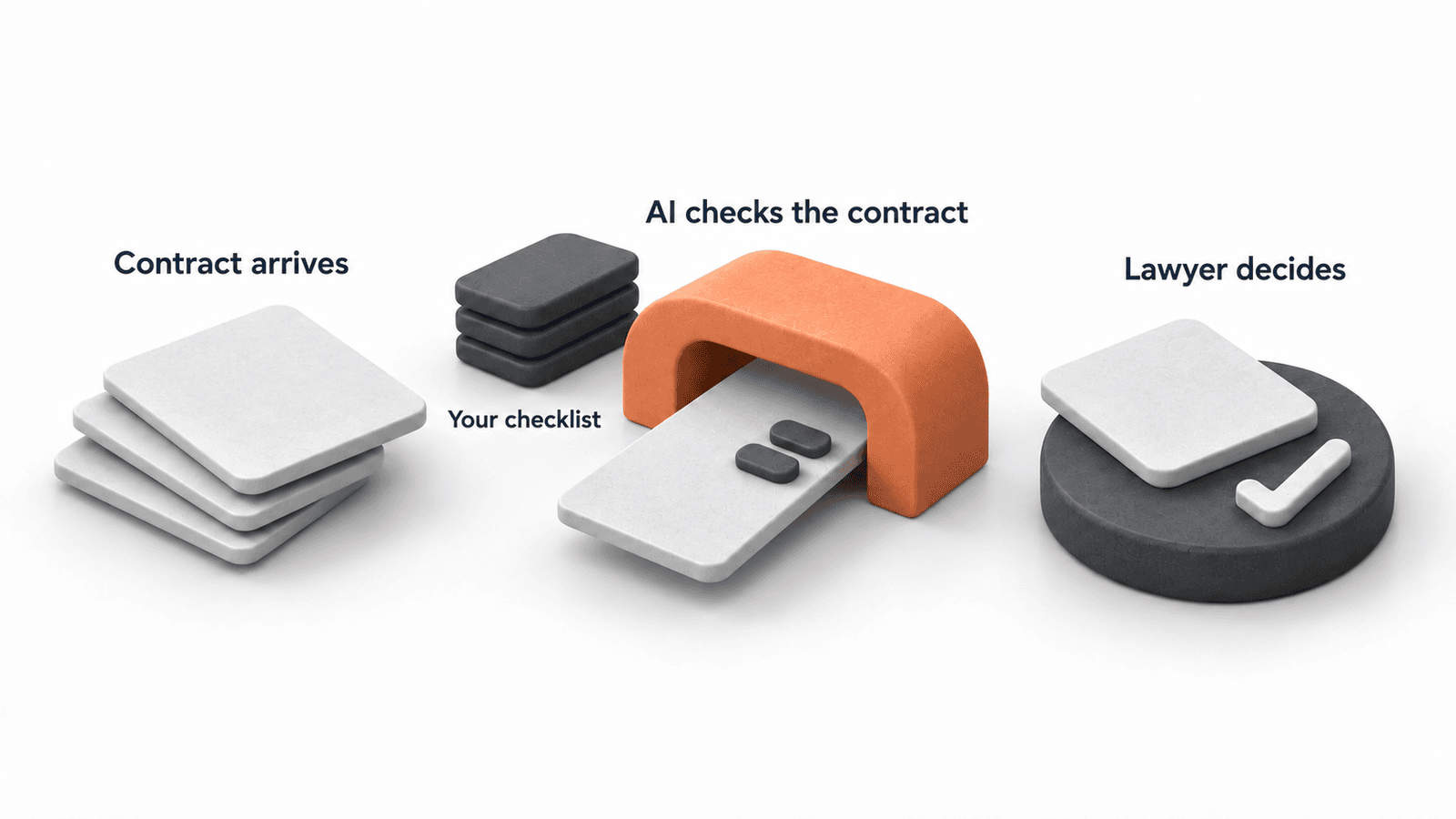
Take a contract check. A contract arrives. The AI compares it with your checklist and drafts a summary of what is different. A lawyer decides what happens next.
The steps are the same every time, so you can test it and trust it.
How is it different from RPA and AI agents?
Think of it as three levels.
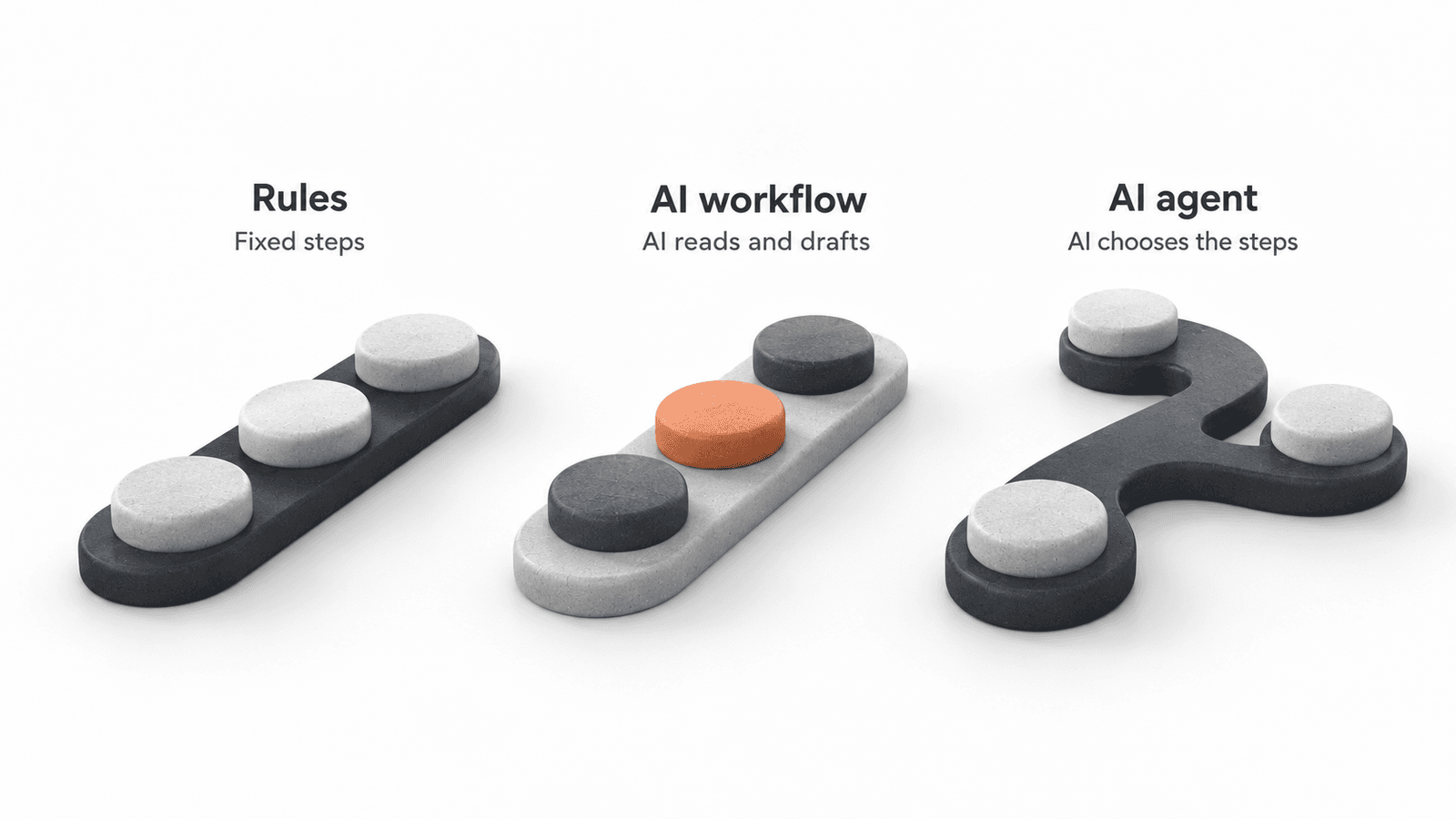
Rule-based automation (RPA, Zapier-style rules) follows fixed if-then rules. It works with clean data and breaks when an email is worded differently or a PDF changes layout.
An AI workflow can read that messy input. You still decide the steps in advance. Anthropic describes workflows as systems where the AI and tools follow "predefined code paths".[1]
An AI agent decides its own steps. You give it a goal and tools, and it plans the route. That makes it flexible, but harder to test and more expensive to run.
For a weekly report or a contract check, you rarely need an agent. Gartner expects over 40% of agentic AI projects to be canceled by the end of 2027, mostly over costs and unclear value.[2]
What are good examples for office teams?
Good examples share a shape. Something arrives regularly, a few steps need reading or writing, and a person decides at a clear point.
Month-end reporting
The workflow pulls the figures from your finance system, compares them with last month and the budget, and drafts the comments on what changed. A controller checks the big movements and approves.
The AI never invents a number. The numbers come from the system, and the AI only explains them.
Contract checks
The workflow pulls out the clauses, compares them with your playbook and flags the differences. The lawyer reads the flags instead of every page.
This only works when the playbook is written down. If the rules live in one person's head, that is your first project.
Sales call preparation
Before a call, the workflow collects what you know about the customer from the CRM, recent orders and public sources. It drafts a short brief. The salesperson reads it in two minutes instead of spending twenty minutes collecting it.
In one of Anthropic's customer stories, an Apollo customer reports 40% less time spent on prospecting.[3] That is a vendor figure, so treat it as a direction.
Customer request intake
The workflow reads incoming requests, sorts them by type and urgency, adds the context a colleague needs and routes them. Simple cases get a drafted reply. Unclear ones go straight to a person.
The win is that requests stop waiting and stop bouncing between people.
Shift handovers and circulars
At Oman Airports, an aviation admin officer handled emails, translation, coordination, KPIs and training documents. A general AI chat did not know the department's formats, approvals or safety rules.
During the workshop, they built an agent for shift handovers, bilingual circulars and gaps in audit evidence. It had built-in checks and named approvals, and it could not invent facts or make safety calls.
Questions about your own data
We are building a sales assistant with a manufacturer. Their team can ask which customers are buying less or who pays late.
The AI never sees the whole database. It uses a few approved analyses that return checked numbers. Every answer points back to the analysis it came from.
Let the AI explain the numbers. Let your systems calculate them.
Which workflow should you automate first?
Check each candidate with four questions:
- Does it repeat every week?
- Can you explain the steps to a new colleague?
- Where does a person need to check or decide?
- Does it use files, emails or data you can already reach?
Then ask one more: what happens when the output is wrong? A bad draft of an internal summary costs a few minutes. A wrong figure on a client invoice costs trust. The higher the cost of a mistake, the more checking you need.
You can run these checks yourself with the free AI workflow self-audit.
Where should people stay in charge?
Wherever a mistake would reach a customer, a decision or a number someone relies on.
Plan those checkpoints before you build. For each one, agree who checks, what they check against and what happens when they say no.
A reviewer with a clear checklist needs minutes. A reviewer who has to redo the work makes the whole thing slower than before.
Test the checkpoints too. At Oman Airports, participants tested their agents against instructions hidden inside emails. That exercise showed everyone why an agent needs boundaries and a named person who approves its output.
BCG surveyed 1,330 executives in 2026. Only 5% said they had all the controls in place to let AI make real decisions.[4]
How do you build one?
We follow four steps with the people who do the work:
Map it. Walk through a recent example together. Note every step, tool, handoff and how long each takes. That is your baseline.
Redesign it. Remove handoffs that only exist because of old tools. Agree what the AI does and where people check.
Build and test it. Connect the tools and run real cases from the last few weeks. Fix what fails. Go at the speed your team can check: in our sales assistant project, nothing new starts until the client's team has tested the last piece.
Run and improve it. Launch it, train one person to own it and compare the results with your baseline after a month.
Most projects skip the second step. Then you get a faster version of a process nobody would design today. More on that in what AI workflow redesign looks like.
Why do these projects fail?
Usually for one of three reasons. Nobody picked the workflow for a business reason, nobody owns it after launch, or nobody measured the work before it changed.
The fix is boring and it works. One workflow, a baseline, clear checkpoints and a named owner. Then the next one.
How can we help your team?
If your team repeats a process every week and you want it rebuilt properly, that is what we do in AI Workflows. We map it with your team, build and test it on your approved tools, usually in four weeks once access to your tools works, and train someone to own it.
Not sure where to start? The free AI workflow self-audit walks you through the four questions with your own AI tool. More on aibl.to.
Frequently Asked Questions
What is AI workflow automation?
A fixed set of steps where AI does the reading, sorting and drafting, simple automation moves the data, and a person approves what matters. The steps are the same every time, so you can test it.
How is AI workflow automation different from RPA?
RPA follows fixed rules and breaks when the input is messy. An AI workflow can read emails, contracts and PDFs and make a first judgment. Many teams use both.
What is the difference between an AI workflow and an AI agent?
In a workflow, you decide the steps. An agent decides its own steps. Workflows are easier to test, so they fit most recurring business processes.
Which workflows should we automate with AI first?
Work that repeats every week, has steps you can explain, has clear points where a person decides and uses data you can already reach. A weekly report, a contract check or request intake are good first picks.
Do we need new tools to automate a workflow with AI?
Often not. Many first workflows run on tools you already approved, like Claude, ChatGPT or Copilot. Custom code makes sense when you need your own data with checked numbers.
Related articles


Where would AI help your team?
Tell us about your team and the work you want to change. We'll help you pick the right next step.