How Do You Measure AI Productivity at Work?
August 31, 2026

AI can make an employee dramatically faster without making the organization dramatically better. That distinction is becoming one of the most important things to understand about AI productivity.
A person might use AI to prepare a report in 30 minutes instead of two hours, analyze a larger set of documents, respond to customers faster, write more code, or prepare better research before a meeting. Those gains are real, but they only describe what happened to one part of the work.
The more useful question is what happened to the workflow around that person. Does somebody still need to review the output? Does the report still wait two days for approval? Did the additional output create more work downstream? Was the time saved used for something more valuable? Did the customer get a better result?
This is why measuring AI productivity is harder than measuring AI usage or asking employees how many hours they save. The real question is not simply whether a person became faster. It is whether the organization became better at turning work into useful outcomes.
Is AI usage the same as AI productivity
Many companies started their AI programs by measuring adoption. They track licenses, active users, prompts, tools deployed, pilots launched, and employees trained. These numbers can tell you whether AI is being used, but they say much less about whether the business has actually improved.
Deloitte's 2026 State of AI in the Enterprise illustrates the gap. Thirty-seven percent of surveyed organizations described their use of AI as largely surface-level, with little or no change to existing processes. Another 30% were redesigning key processes around AI, while 34% reported deeper business transformation. All three groups can capture efficiency gains, but only some are changing the way the business actually works.[1]
A company can therefore have widespread AI adoption while continuing to operate in almost exactly the same way as before. Employees may be using AI inside individual tasks, but the workflow can still contain the same handoffs, delays, approvals, manual transfers, and information bottlenecks.
AI usage is an input. Productivity is an outcome.
Should you measure the task or the workflow
Consider a weekly management report. The current process might involve collecting data, cleaning it, analyzing the numbers, drafting the report, reviewing it, revising it, getting approval, and finally distributing it.
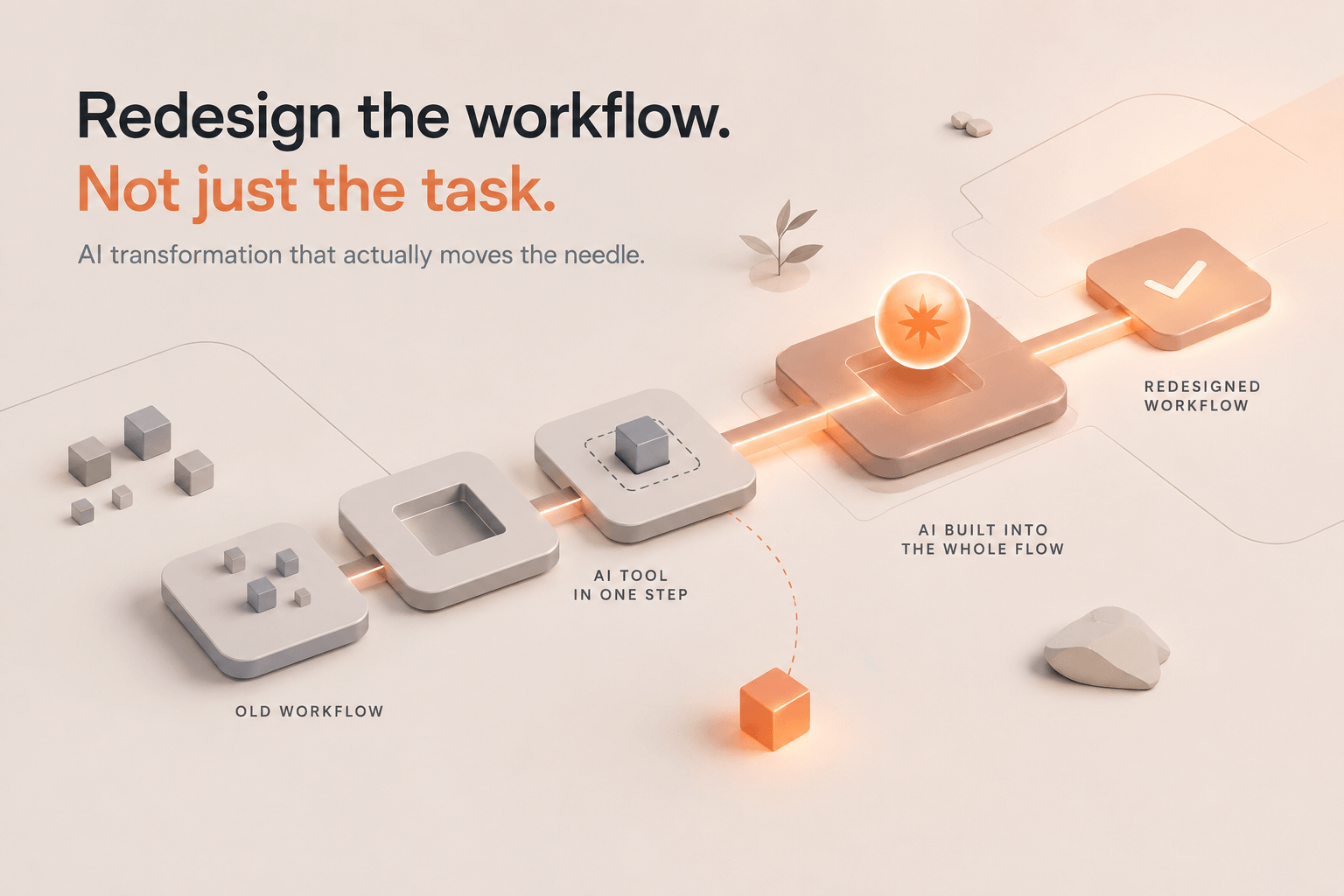
Now imagine adding AI to the analysis and drafting stages. Those two activities become dramatically faster. That is useful, but suppose the data still takes a day to collect, someone manually checks every number, three people still review the document, and approval still takes another day.
The task became faster. The workflow barely changed.
This distinction is increasingly visible in enterprise AI research. McKinsey reported in 2026 that only 21% of companies had fundamentally redesigned their operating models around AI. The higher-performing companies in its research were much more likely to redesign workflows and operating models rather than simply accelerate existing work.[2]
The important change is not that an employee can produce the same artifact more quickly. It is that the full path from input to useful outcome becomes smaller, faster, more reliable, or more scalable.
What should you measure first
The first useful metric is usually total cycle time. Instead of asking how quickly AI completed one task, measure how long the complete process takes from the moment work enters the system until a useful outcome is produced.
This exposes delays that task-level measurements miss. An employee may save 45 minutes writing a document while the document still spends three days waiting for information, review, or approval. In that case, the writing step was never the main constraint.
Once you look at the whole workflow, the conversation changes. You start asking where work waits, where people gather context manually, where somebody copies information between tools, where the same work is checked repeatedly, and where expertise becomes a bottleneck.
These are often larger opportunities than the task that first attracted attention to AI.
How much human effort does the workflow still require
A faster workflow is useful, but another important question is how much human effort it requires.
Two processes might both take one day from beginning to end while one requires six hours of manual work and the other requires only one. That difference matters because AI often creates value by reducing the amount of attention required to keep a process moving.
Look at how many manual steps remain, how often information is re-entered, how many people touch the work, how much time is spent gathering context, and how much effort goes into review and correction.
This is particularly important because AI can move work instead of removing it. A person produces something faster, but another person now spends additional time checking it. If that downstream effort is not measured, the organization may believe it created a large productivity gain when it actually shifted workload from one person to another.
What happens if speed improves but quality drops
Speed should never be measured in isolation. A workflow that becomes twice as fast but produces more errors, more rework, or lower-quality decisions may not be an improvement.
Quality will look different depending on the work. For customer support, it might mean resolution quality, escalation rates, consistency, or customer satisfaction. For reporting, it could mean accuracy, completeness, and the amount of correction required. For software, it may include defects, test failures, or rework. For research, it could mean coverage, factual accuracy, and the quality of the resulting decision.
The relevant metric changes, but the principle does not. Productivity should capture both how much work is required and what comes out the other side.
Is capacity more useful than hours saved
One of the most interesting effects of AI is that it can increase the scope of what a team is capable of doing.
A support team might previously have analyzed only a sample of customer conversations because reviewing all of them was too expensive. With AI, it may become practical to analyze every conversation. A sales team might research only the largest accounts manually, while an AI-enabled workflow makes deeper research possible for every account. An operations team might move from monthly analysis to continuous monitoring.
This changes the productivity question. The value is no longer just that the same piece of work takes fewer hours. The organization may now be able to do something that previously was not economically practical.
We have seen this directly in recent client work. In one engagement, the business objective was not simply to save a few hours per employee. The goal was to help an existing team handle materially more work without immediately adding headcount. That forced us to measure productivity as capacity created, not just time saved.
Are hours saved a good AI productivity metric
Hours saved is still a useful measurement, but it should be treated as an intermediate metric rather than the final result.
BCG's 2026 AI at Work research found that 42% of regular AI-using frontline employees reported saving at least eight hours per week. That is a significant gain. At the same time, BCG found that many organizations had not worked out how to convert those hours into additional value, and many workers were not redirecting the time toward more strategic work.[3]
This creates an important management question: what happened to the saved time?
An employee might use it to serve more customers, improve the quality of their work, take on a higher-value project, experiment with new ideas, reduce overtime, or simply produce more material for another person to review. Those outcomes have very different consequences for the business.
This is why a statement such as "AI saved us 500 hours this quarter" is not yet an ROI calculation. The next question has to be what those 500 hours enabled the organization to change.
What happens when AI moves the bottleneck
As AI makes production cheaper, other constraints become more visible. Drafting becomes faster. Research becomes faster. Analysis becomes faster. Coding becomes faster. Preparing presentations becomes faster. But judgment, expertise, prioritization, accountability, and decision-making do not increase at the same rate.
This can create a strange productivity problem. The employee producing the work becomes dramatically faster while the person who needs to review, validate, prioritize, or act on that work does not.
BCG's 2026 research reflects this shift. Close to half or more of respondents reported spending more time reviewing and correcting AI output or managing and directing AI, while 41% said AI had increased the time they spent making decisions.[3]
AI did not necessarily reduce productivity. It changed where the work was concentrated.
When production becomes easier, review can become the bottleneck. When information becomes abundant, judgment becomes the bottleneck. When anyone can generate ten options, deciding which option matters becomes the expensive part.
What should you measure before you build
The most useful change we have made in our own implementation work is to agree on the measurement before building the workflow.
In recent projects, we have sized automation candidates against a hard KPI first. Depending on the workflow, that might be hours saved per person, cycle time, throughput, error rate, response speed, quality, or another business measure. We then return to the same metric after the workflow is actually in use.
That sounds obvious, but it changes the conversation completely. Without a baseline, teams can usually tell that the workflow feels faster, but they cannot prove what changed. With a baseline, you can distinguish a useful demo from a meaningful operational improvement.
This is also why we have become less interested in universal AI ROI metrics. Different workflows exist for different reasons. A launch process may need to become faster. A compliance process may need to reduce errors. A customer workflow may need to increase throughput without sacrificing quality. A management process may need to reduce the amount of attention required to keep information moving.
The KPI should match the job the workflow exists to do.
Which metrics should go into an AI productivity scorecard
At Aibl.to, we usually want to answer five questions after changing a workflow. Did the work become faster? Did the quality improve? Did the workflow require less human effort? Did the capacity created by AI move people toward more valuable work? Most importantly, did the business result improve?
In recent discovery work, this has meant tracking combinations of cycle time, throughput, quality, errors, manual handoffs, and speed to outcome rather than relying on a single "hours saved" number. That mix is much closer to how operational value actually appears in a business.
The exact metrics differ, but the principle stays the same: measure the workflow before and after the change.
Where should you start measuring AI productivity
This is why we do not recommend beginning an AI productivity program with a company-wide AI dashboard.
Start with one recurring piece of work. Map how information enters the process, where context is gathered, where people make decisions, where work waits, where someone reviews the result, and where information moves between systems. Establish the baseline, redesign the process, and compare the outcome.
The task is rarely the right unit of AI transformation. The workflow is.
A stronger model can make one step inside a poor process faster. It does not automatically make the process good.
Asking employees how much time they save with AI is therefore useful, but it should not be the final question. Ask what the organization can now do better, faster, cheaper, or at a scale that was not practical before. Then ask what actually changed in the workflow to make that possible.
That is where individual AI productivity begins to turn into organizational productivity.
Frequently Asked Questions
How do you measure AI productivity in a company?
Measure changes in the full workflow rather than relying only on AI usage. Useful metrics include cycle time, human effort, review time, quality, error rates, throughput, capacity, cost, and the business outcome the workflow exists to create.
Is time saved a good measure of AI ROI?
It is useful, but incomplete. You also need to understand what happens to the capacity AI creates and whether it leads to higher output, better quality, lower costs, faster decisions, or another measurable business result.
What is the difference between AI adoption and AI productivity?
AI adoption tells you whether people are using AI. AI productivity tells you whether that usage improves the work and its outcomes.
What should you measure before implementing AI?
Establish a baseline for the current workflow. Record cycle time, human hours, handoffs, review effort, errors, throughput, cost, and the relevant business outcome before making changes.
Should AI productivity be measured at the employee or workflow level?
Both can provide useful information, but workflow-level measurement is usually more valuable for understanding organizational impact. Individual productivity gains can create new bottlenecks elsewhere in the process.
Related articles

Show us how your team works.
Bring a process that wastes time or money. We will help you build an AI workflow around your data, tools and limitations.