AI Won't Transform Your Team Until You Redesign the Workflow
August 24, 2026
AI Won't Transform Your Team Until You Redesign the Workflow
Software engineering is showing us what AI transformation actually looks like.
And it has surprisingly little to do with writing code faster.
The interesting shift isn't happening at the level of the individual task. It's happening one level above it.
AI can now take a ticket, understand the context, write the code, run the tests, review the change, update the docs, deploy it, monitor what happens, and feed the result back into the next cycle.
The point isn't that the workflow has been redesigned around what the agent can do.
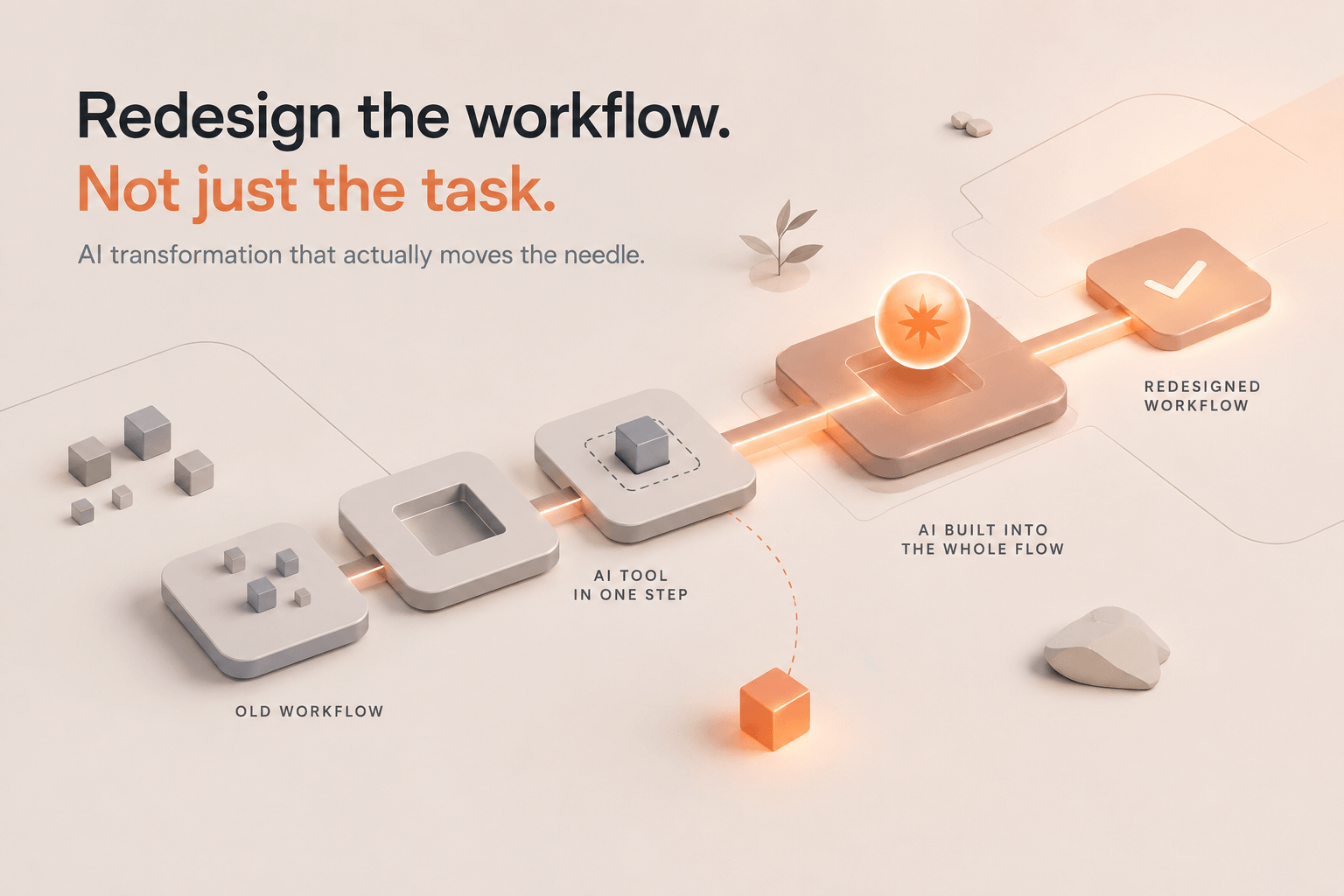
That distinction matters far beyond engineering, because most companies are doing the opposite. They're taking the workflows they already have, inserting AI into one or two steps, and calling that transformation. It is not.
The task is not the unit of AI transformation
I see this constantly in workshops.
A team finds a report, proposal, analysis, compliance document, or other piece of work that takes hours. They put AI in the middle of it. The AI makes one step faster. Everyone is happy for a week.
Then the same workflow starts again.
Pull data from five systems → clean it → paste it into a spreadsheet → interpret it → write the report → send it → wait for someone to ask a question → repeat next week.
AI made one step faster. The workflow is unchanged. Now redesign the whole thing. The system starts from the underlying data automatically. It checks for anomalies. It compares performance against previous periods. It flags the changes that actually matter. It drafts the first analysis and prepares the report. A human reviews the conclusions that count. The final version goes out. The next cycle starts from fresh data without someone having to orchestrate the whole thing again.
That's a different system, not a better prompt. It's workflow redesign.
This is also why I've been arguing that the bottleneck is the workflow, not the model. A stronger model can make a bad workflow faster. It does not make it a good workflow. I explored the same idea in Claude Fable 5: What it means for your work, in plain terms, where the key question wasn't whether the model was stronger, but whether the workflow around it was ready.
Engineering figured this out first
This is why the recent evolution of AI-assisted software engineering matters even if you're not an engineer.
The model isn't simply:
Developer + Copilot = faster coding.
It's:
Signal → triage → execution → review → deployment → measurement → next signal.
The human sets intent and makes the judgment calls. The system handles more of the mechanical execution in between.
Research on AI-native software development lifecycles makes the same case: improving a single phase in isolation produces limited overall gains. The bigger returns come from connecting planning, implementation, review, testing, deployment, and operations into one system.
Real deployments are starting to show the same pattern. Factory reports 550,000 engineering hours saved across customers, a 20% reduction in development cycle time, and a 3x drop in code churn from running agents across the lifecycle rather than automating one isolated task.
That's the operating model every other department should work on.
Every knowledge-work team has a lifecycle
Take legal.
A request comes in. Someone reads it, figures out what's needed, searches previous work, researches the relevant material, drafts something. Someone reviews it, changes get made, the final document goes out, and it gets filed somewhere.
Three months later, someone asks for the same thing again. AI can help with almost every step in that chain.
But ask this: "What should this workflow look like if AI is available at every step?"
Same question for HR, sales, finance, procurement, operations, consulting, customer support, and research.
These are all forms of knowledge work. People move information between systems, interpret documents, make repeatable decisions, produce outputs, and check someone else's work.
The workflows are not fundamentally different from software workflows. They're just less standardized, which makes redesigning them even more important.
The biggest opportunity is between the steps
Most AI conversations are still too narrow. Can AI write this report? Can AI summarize these documents? Can AI answer these emails? Can AI build this deck? But the expensive part of knowledge work usually isn't the task itself. It's everything around it: the handoff, context gathering, waiting, copying, checking, deciding what happens next, finding information, pulling an expert into every case, moving between systems, and manually dragging the output into the next tool.
That's where the workflow leaks. And AI gives us a real way to redesign the interfaces between people, information, and systems, not just the individual steps.
Why AI adoption is the wrong goal
We've spent a lot of the first phase of enterprise AI measuring adoption: how many licenses, how many prompts, which model, and how many active users. But some of the numbers should make us question what we're actually measuring. One dataset I've used in my own work found that 49% of workers had never used AI at work, while only a minority used it daily. At the same time, 42% of companies had abandoned AI projects in 2025, up from 17% the year before.
The lesson isn't that adoption is bad. It's that adoption alone tells us very little. A company can get more people into ChatGPT and still run almost the same operating model it had before. People are faster inside the old workflow, but they're still doing the old workflow. That's the trap.
A better question is: How much of the work can now move from signal to useful outcome with less human intervention? Don't measure prompts. Measure the workflow.
The human doesn't disappear. The role changes.
Another lesson is worth borrowing from engineering. Automation doesn't make human judgment less important. It makes mechanical execution less important. When the system handles more of the "how," people spend more time on the "should": what should we do, is this the right outcome, what are we missing, should this get escalated, and what happens next?
The same shift applies in knowledge work. A lawyer shouldn't become a professional document reviewer for an AI. A marketer shouldn't turn into an AI-powered spreadsheet operator. An HR professional shouldn't spend the day babysitting a chatbot. The opportunity is to strip out the mechanical layer around people's expertise, so more of their time goes toward the parts where judgment actually matters.
That's the equation I keep coming back to: AI + borrowed expertise + your own expertise and process + automation = time saved. And if that time doesn't create better work, more creative thinking, or a better working life, we probably automated the wrong thing.
Don't automate the old workflow
This is probably the biggest mistake a company can make.
Take a ten-step process. Automate step four. Then automate step seven. Bolt on a chatbot. Add an agent. Wire up another SaaS tool.
Six months later, you've got an "AI-enabled workflow" that's still fundamentally the same ten steps, except now it has twelve tools and someone has to maintain all of them.
I've written before about why companies adopt AI backwards: the tool shows up before the problem. The same mistake happens inside workflows. The automation shows up before anyone has redesigned the work.
I use four questions to find the workflows worth changing.
The 4 Gates
1. What repeats?
If it happens once a year, it probably isn't your first automation candidate. If it happens every week, you have a different conversation.
2. Can you describe the steps?
If you can explain the process to someone else, take this information, check this, produce that, then send it here, you have something we can work with.
If the process is simply "I just know what to do," it probably needs more understanding before it needs automation.
3. Where do you need to approve?
This is where expertise belongs.
If you need to make a judgment call at every step, keep that part human. If the workflow can run and you only need to review the important decisions or the final output, that's much more interesting.
4. What does it connect to?
Files? Email? A spreadsheet? A database? Your CRM?
The best first workflows usually connect to tools you already have and can be built without turning the project into an integration exercise.
The 4 Gates are deliberately simple. They are not an AI architecture framework; they're a filter for finding the work worth changing.
Pick one workflow. Get it working. Then expand.
This is the shift I'm working toward
I've spent the last year helping teams adopt AI, running workshops, and building AI systems. The pattern is becoming pretty clear to me: the teams that get stuck usually aren't missing another AI tool. They're missing a map of their own work.
I've seen data scientists want to understand how the technology works. I've seen non-technical teams find useful AI opportunities faster because they started from the work instead of the technology. I've seen C-level teams care less about which model they should buy and more about control, trust, and what actually changes in the business.
And in our Oman workshop, we deliberately did almost the opposite of a traditional AI training session. We led with the outcome, not the vocabulary. People didn't need a lecture on agents, skills, or MCPs before they could find valuable work to change. That experience reinforced something I already believed: The tooling isn't the point. The work is.
At Aibl.to, that is how we approach AI adoption now. Start with the actual work, find the workflow worth changing, and redesign it with the people who own it. Then decide what disappears, what gets automated, what becomes a reusable skill, what becomes an agent, what stays human, what context the system needs, and how the result gets verified. Then build it.
Not a generic demo. Not another strategy deck. A working system inside the workflow the team already owns.
The next AI advantage won't come from using more AI
It will come from changing the shape of work. Engineering is already showing us the preview: not AI bolted onto a task, but AI woven through an entire lifecycle. Knowledge work is next.
The companies that benefit most won't necessarily be the ones with the most AI tools. They'll be the ones willing to ask the uncomfortable question: If we were designing this workflow from scratch today, knowing what AI can do, would we design it this way?
If the answer is no, don't automate the workflow. Redesign it first.
Frequently Asked Questions
What does workflow redesign mean in the context of AI?
It means rebuilding the sequence of steps a team follows, rather than inserting AI into one step of an existing process. Map the full lifecycle, then redesign it around what AI can now do across the workflow.
Why is software engineering used as the model for this?
Engineering is moving from AI helping with individual coding tasks toward systems that carry work through triage, implementation, review, testing, deployment, and monitoring with fewer manual handoffs. Other departments can borrow the operating-model lesson without copying the engineering tools.
Why isn't AI adoption a good success metric?
Licenses, prompts, and active users show that people are using a tool. They do not show that the underlying operating model changed. A better question is how much work now moves from signal to useful outcome with less human intervention.
Does workflow redesign replace human judgment?
No. It removes more of the mechanical execution around expert work, allowing people to spend more time on intent, judgment, verification, and escalation.
What are the 4 Gates for finding an automation candidate?
Ask: What repeats? Can you describe the steps? Where do you need to approve? What does it connect to? The best first candidates are repeatable, describable workflows where human approval is concentrated at meaningful points and the required connections are manageable.
What's the risk of automating a process without redesigning it first?
You end up with the same old workflow plus more tools bolted onto individual steps. The process does not actually change shape; it just becomes harder to maintain.
How does Aibl.to approach AI workflow redesign?
We start with real work, not tool training. We identify the workflow worth changing, redesign it with the people who own it, and build a working system around their expertise, context, tools, and approval points.
Related articles
Show us how your team works.
Bring a process that wastes time or money. We will help you build an AI workflow around your data, tools and limitations.