How Do You Integrate AI Into Your Business?
October 19, 2026

Most companies already use AI somewhere. A few people draft emails with ChatGPT, someone summarizes reports in Copilot.
In the Netherlands, 45% of companies with 50 to 249 employees used AI in 2025, according to provisional CBS figures.[1] Two years earlier it was 20%.
The hard part comes next. You want AI to do real work inside the business, on your own data, with someone responsible for the result.
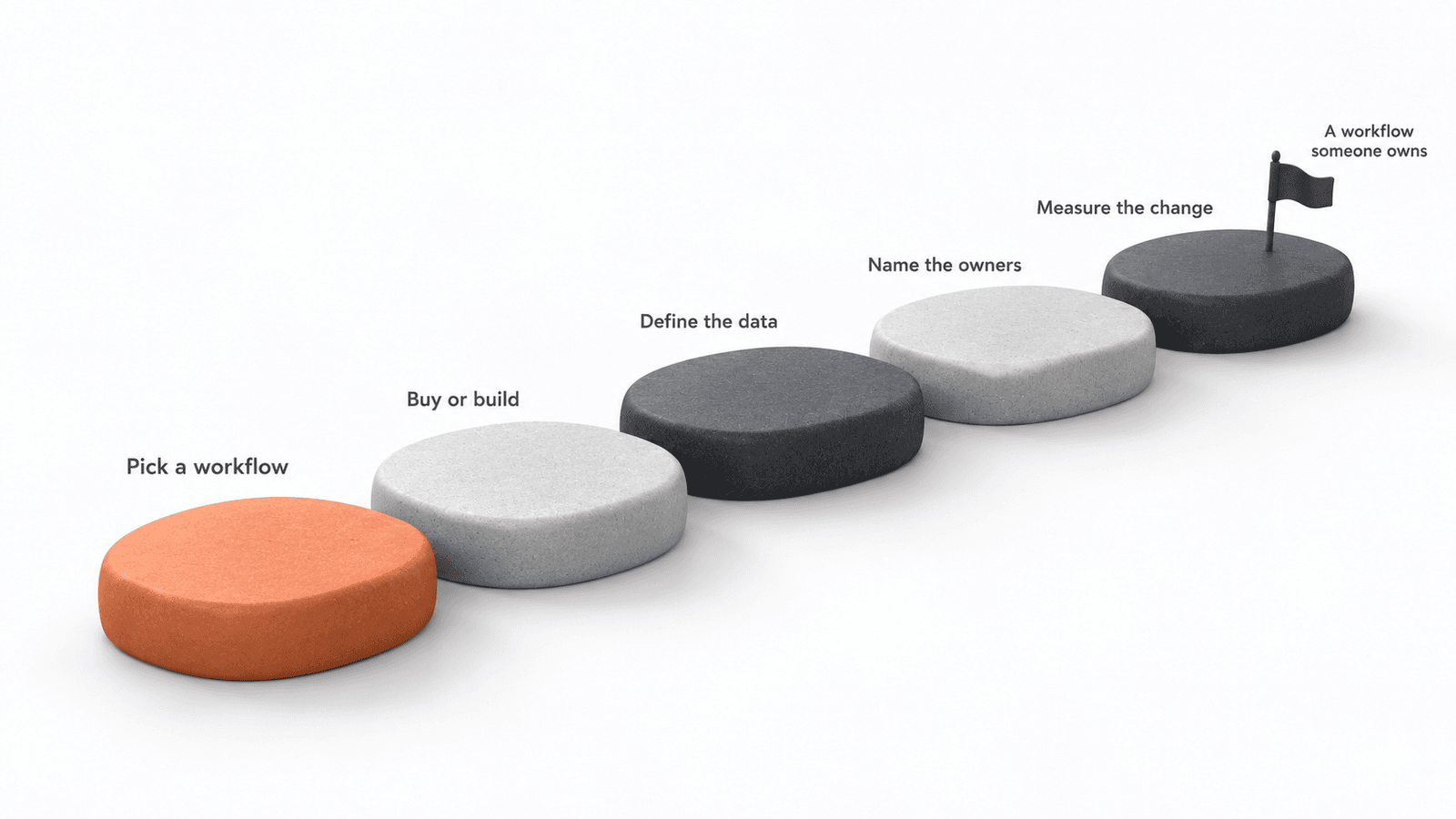
Below is the order I would follow in a company of 50 to 500 people.
Why do so many AI projects stall?
Most stall between the pilot and daily use.
In 2025, 42% of companies abandoned most of their AI projects before they reached production, according to an S&P Global survey of over 1,000 companies in North America and Europe. A year earlier it was 17%.[2]
The pattern is familiar. You buy licenses, run a pilot, and six months later nobody can say what changed. The tool came first and the problem came later.
You may have seen the claim that 95% of companies get zero return from generative AI. It comes from an MIT report based on 52 interviews and a few conference surveys.[3] Treat it as a warning, not a fact about your company.
AI budgets disappear between a working demo and a workflow someone owns.
Where should you start?
Start with one piece of work your team repeats every week. Skip the company-wide strategy for now.
I check every candidate with four questions:
- Does it repeat every week?
- Can you explain the steps to a new colleague?
- Where does a person need to check or decide?
- Which files, emails or systems does it touch?
A weekly sales report, a contract check against your own rules or sorting incoming requests usually pass all four. A one-off strategy question does not.
Starting from the problem works even with large groups. At Jabreen Academy's hackathon in Muscat, we barely mentioned models or plugins. Each of the 14 teams started from a problem in their own sector, and 80 professionals left with 14 pitch-ready AI opportunities after two days.
One workflow gives you a baseline, a result your team can check and one person who learns how it works. You reuse all three for the second workflow, which goes faster.
Should you buy a tool or build something?
Buy first. Build only when a bought tool cannot reach your data or cannot be checked.
For most office work, an approved tool like ChatGPT Enterprise, Microsoft Copilot or Claude Team covers a lot of the first year. Set it up with your documents and shared instructions. It also gives people a safe alternative to the personal accounts they already use.
Custom work makes sense when the answer must come from your own systems, with numbers people trust.
We are building a sales assistant with a manufacturer, inside their own Azure environment. The AI never sees the whole database. It calls a few approved analyses that return checked numbers, then explains them. Their sales team can check every answer against what they see in the field.
What does your data need first?
Your data needs an agreed meaning before it needs cleaning.
In the sales project, years of sales history looked clean. Then we asked which date counts as the sale and what a zero means. The answers were in people's heads, so we wrote them down first.
Before you start, sort the data your workflow touches into three groups:
- Never share. Passwords, restricted security documents.
- Remove names first. Customer or staff details.
- Company tools only. Prices, contracts, financials. Fine in a tool your company controls, not in a free personal account.
This takes an afternoon and saves weeks of access discussions later.
Who should own it?
Every AI workflow needs two owners. A business owner decides if the result is good enough. A technical owner fixes it when it breaks.
Without both, the system belongs to whoever built it. When that person or supplier leaves, people quietly stop using it.
Early in the sales project, the client's IT manager asked us to slow down. We were building faster than their team could check. So we changed the plan: nothing new starts until their team has tested the last piece. Today their IT team builds the next analysis themselves, and we review.
What will your team worry about?
Your people will worry about risks before they see any benefit. Plan for that.
At Oman Airports, we asked staff what concerned them before building anything. They named confidential data leaks, unpredictable accuracy, answers that change for the same task and dependence on one provider.
We did not argue those away. Participants built agents for their own work, then tested them against instructions hidden inside emails. Seeing for themselves why an agent needs boundaries and named approvers did more for trust than any slide. One participant said they had been against AI and that the program changed their whole perspective.
What does the EU AI Act ask of you?
If your employees use AI at work, the EU AI Act already applies to you.
Since February 2025, Article 4 asks companies to make sure staff who use AI understand it well enough. That includes someone drafting emails in ChatGPT.[4] You do not need a certificate or an external course. People should know risks like made-up answers, and you should keep a record of the training you gave.
Heavier rules apply when you use AI for things like screening job applicants or evaluating employees. Those start on 2 December 2027.[5]
How do you know it worked?
Measure the workflow before you change it, then again a month after launch.
Four numbers usually tell the story: how long the work takes, how much human time it needs including review, how often the output needs fixing and how much the team handles per week.
In our own projects, we size every candidate against one hard number before we build. In one engagement the goal was not saving hours per person. It was letting the same team handle more work without hiring. That changed what we measured: capacity created, not time saved.
I wrote a longer guide on how to measure AI productivity at work, with a scorecard you can copy.
What are the most common mistakes?
The six I see most:
- Buying a tool before naming the problem.
- Running a pilot without a baseline.
- One enthusiastic person builds everything, nobody else can run it.
- Giving AI access to all your data instead of the few things it needs.
- Ignoring the personal AI accounts people already use.
- Automating the old process instead of redesigning the workflow.
How can we help your team?
Start with one workflow. The free AI workflow self-audit takes about 15 minutes with your own AI tool and points to the task worth fixing first.
When you know the workflow, AI Workflows redesigns and builds it with your team, usually in four weeks once access to your tools works, and trains someone inside to own it. For work on your own systems and data, like the sales assistant, we scope a custom build in AI Projects. More on aibl.to.
Frequently Asked Questions
How much does it cost to integrate AI into a business?
It depends on how big the result is, how many people and systems are involved and how much data work it needs. Tool licenses are usually the smallest cost. Custom systems on your own data cost more, because data work and testing take real engineering time.
How long does AI integration take?
One workflow on tools you already use usually takes four to six weeks to daily use. Custom systems take longer and depend on how fast your IT team can give access to data.
Do we need data scientists to integrate AI?
Not for most first workflows. You need a business owner, the people who do the work today and an IT contact for access. Engineering skills matter once you build on your own systems.
Does the EU AI Act apply if we only use ChatGPT, Copilot or Claude?
Yes. Since February 2025, Article 4 asks companies to make sure staff who use AI understand it well enough. You do not need a certificate, but you should train people on risks like made-up answers and keep a record of it.
What is the first step to integrate AI into a business?
Pick one task your team repeats every week. Write down how long it takes, how much checking it needs and what it produces. That is your baseline.
Related articles


Where would AI help your team?
Tell us about your team and the work you want to change. We'll help you pick the right next step.