How to Build AI Projects Securely at Work
April 17, 2026
A critical stage all professionals inevitably face is proposing the use of AI systems internally in the company. It is a tough transition, especially if the AI systems are customer facing or play with sensitive data.
Your security team isn't wrong to worry. Here's how to address their concerns and actually ship something.
A couple of weeks ago, someone in our community said something like:
I didn't use AI after the workshop because my work prohibits the use of it due to security issues.
It’s a shame that this person mastered the skills. Had the use cases. Had the motivation. But their company managers won’t budge.
Security teams aren't being paranoid. They're looking at real incidents. Samsung engineers pasting source code into ChatGPT, the acting director of CISA uploading government documents to a public AI chat, 225,000 stolen OpenAI credentials showing up on the dark web; making companies reluctant to invest the research and time.
The problem is that "no" often becomes permanent. Not because the risks can't be managed, but because nobody brought IT a concrete plan.
This post is that plan.
What security teams actually worry about
I've talked to enough IT leads and CISOs at this point to see the pattern. Their concerns come down to three things:
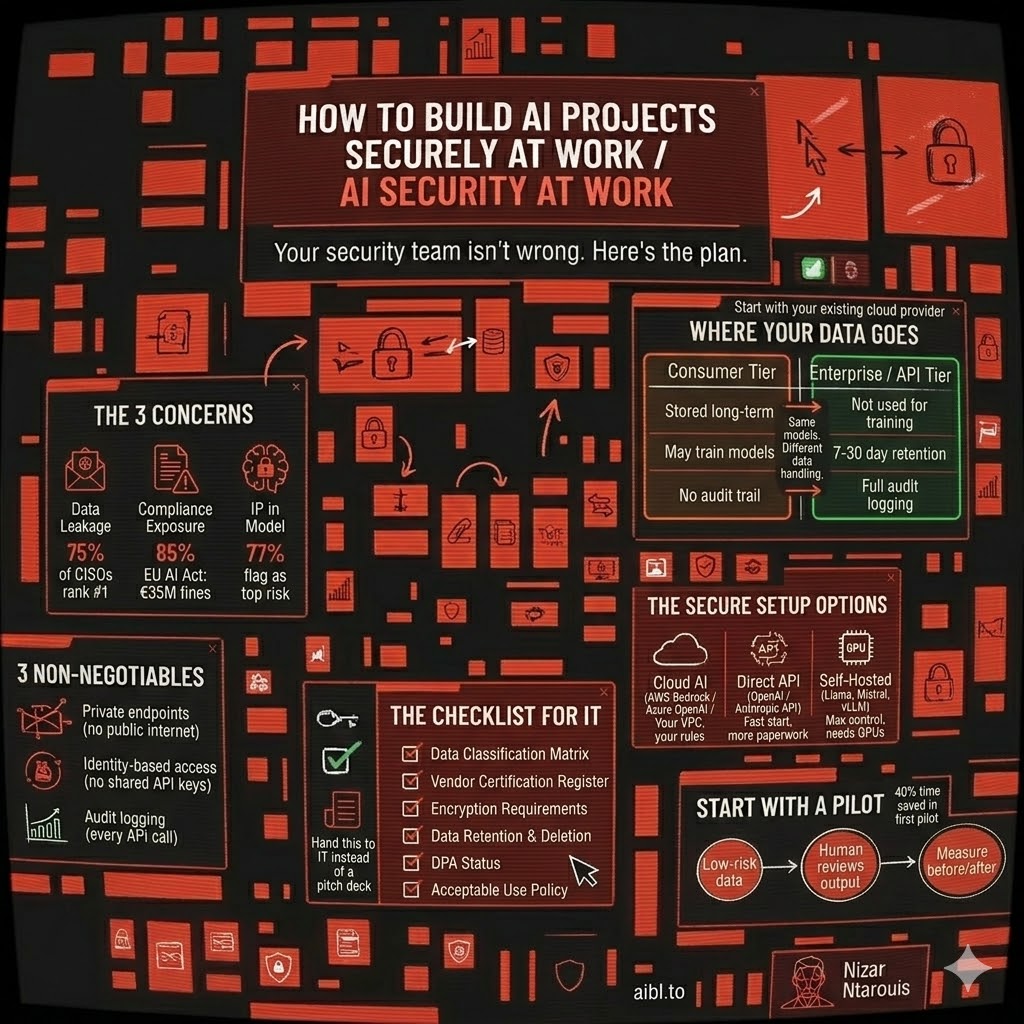
1. Data leakage. When someone on your team pastes a client contract into ChatGPT Free, that data gets stored. It might get used for training. It's gone. 75% of CISOs rank this as their number one concern, and IBM found that shadow AI; employees using unauthorized tools; showed up in 1 out of every 5 breaches in 2025.
2. Compliance exposure. The EU AI Act becomes fully enforceable in August 2026. Fines go up to 35 million euros or 7% of global revenue. Meanwhile, only 22% of organizations have written policies for how employees should use AI. That gap is a liability.
3. IP ending up in someone else's model. 77% of organizations flag this as a top concern. When your team submits proprietary code or strategy docs to a consumer AI tool, that data may feed into future model training. Your competitive advantage becomes everyone's training data.
I can go on and on about examples of PII or confidential information leaking into AI companies’ databases for future fine-tuning of their models - or worse, in the case of customer-facing AI applications, being exposed to malicious users who manipulate the Language Models into revealing sensitive data.
All these concerns are interconnected. One Samsung engineer pasting source code into ChatGPT simultaneously created a data leak, a compliance violation, and an IP exposure. Security teams can't solve these in isolation, and they know it.
Where your data actually goes
Here's where it gets practical. Most people don't know the difference between using ChatGPT Free and using the API.
Consumer tier (ChatGPT Free/Plus, Claude Free/Pro, Gemini): Your conversations are stored long-term. They may be used for training. Opting out often means losing features like chat history. This is what your employees use when they sign up with their personal email.
API / Enterprise tier (OpenAI API, Claude API, Azure OpenAI, AWS Bedrock): Your data is not used for training. Retention is minimal: Anthropic's API keeps data for 7 days, OpenAI's for 30 days, solely for abuse monitoring. Enterprise plans add zero-retention options, data residency controls, and encryption key management. This is the one you need.
The difference is night and day. Same models, completely different data handling. And completely different costs.
And here's the real kicker: over 80% of employees already use unapproved AI tools at work. 38% admit to sharing confidential data with these platforms. The goal is not to restrain from sharing sensitive data with these models, we do it all the time, it's to have visibility into how it's being used.
A European financial services firm discovered employees were using free Gemini to summarize client meeting notes. No Data Processing Agreement, data processed in the US, GDPR violation waiting to happen. They switched to Vertex AI through their existing Google Cloud contract, same workflow for employees, full compliance, zero training risk.
The secure setup options
If you don’t know any of the below concepts or applications then ask your favourite AI for guidance, or request for a detailed blog on them in the community 😉
You don't need to sign up with OpenAI or Anthropic directly. The same models are available through your company's existing cloud provider — https://aws.amazon.com/bedrock/, https://azure.microsoft.com/en-us/products/ai-services/openai-service, or https://cloud.google.com/vertex-ai. Your IT team already trusts that provider, the security controls are already in place, and you skip the entire vendor approval process.
Have a talk with your security team - If the company runs on AWS, look at Bedrock. Azure, look at Azure OpenAI. GCP, look at Vertex AI. Each one wraps foundation AI models in your existing cloud security. VPCs, private endpoints, IAM, encryption. Your data never leaves your controlled environment.
Self-hosted models (Llama 3, Mistral, Qwen with vLLM or NVIDIA NIM) give you maximum control. No third-party data exposure at all. But you need GPU infrastructure and ML ops expertise. This only makes sense for highly regulated industries or very high volume, roughly 2 million+ tokens per day before it becomes cost-effective.
The practical choice usually comes down to which cloud you're already on. Extending your existing environment is always simpler than onboarding a new vendor.
Three non-negotiables regardless of which option you pick:
- AI traffic stays inside your company, nothing hits the public internet
- Since its in your company’s private network, every person who uses it logs in with their work account, no shared passwords or keys
- Every request is audited, meaning the IT team is aware of what goes in and out these AI systems
And the most important rule: if the secure option is harder to use than ChatGPT, employees will bypass it. Make the approved path the easy path. The setup should be as simple as logging in with your employee email.
A security checklist you can hand to IT
Instead of going to your IT team with "can we please use AI?", go prepared for any question they might throw at you:
- What data touches the AI? Classify it - public, internal, confidential, restricted. Define which tools can handle each tier.
- If they ask about the security certificates. Don’t sweat it. All the major AI providers (OpenAI, Anthropic, Google, AWS, Microsoft) all have SOC 2 Type II and ISO 27001 certifications.
- Is the data encrypted? The vendors already have enterprise-ready encryption (one, two, three), but you could take extra precautions, which we will cover in future blogs 😎.
- How long do they keep your data? AI providers provide the option for a zero-data retention option, and since your company is using a cloud provider, the data stays in your own environment 🙌.
- Is there a Data Processing Agreement? If the AI tool touches personal data, you need one. But don’t worry it’s easy, your legal team can request them directly, since all the major providers (Anthropic, OpenAI, Google, AWS, Microsoft) all offer standard DPAs.
- Who can use what? The cool thing about the cloud is that you can set permissions and link them to different employee emails. So the IT team has full control over who uses which AI tool and to which extent.
This checklist does two things. It gives IT a concrete framework to evaluate against instead of defaulting to "no." And it gives you credibility, it shows that you have researched and that you know what you’re talking about; you're presenting a governed approach.
Start small
Don't try to roll out AI across the company. Pick one process that meets three criteria:
- It uses only low-sensitivity or public data
- A human already reviews the output before it matters
- You can measure the performance
Set a 30-day window. Check the data flow end to end: what goes in, what the AI sees, what gets stored, what comes back. Use the checklist to pre-approve the tool before day one.
The Above Works
Here are some examples, of industries that followed through:
- A consulting firm piloted AI meeting summarization for one team of eight. Corporate API, no data retention, internal notes only. After six weeks: 40% reduction in time spent writing recaps. The documented data flow map became their template for every subsequent AI evaluation.
- A logistics company tested AI for classifying support emails, non-sensitive categories only, nothing with financial data. First-response time dropped 35%. Compliance signed off because they could see exactly what data the model touched.
The pilot is about building the governance framework with real data instead of hypotheticals. Your IT team would rather evaluate a documented pilot than a PowerPoint.
What to do Monday morning
- Find out what AI tools your team is already using (they are, whether you know it or not)
- Download or build the six-section checklist and fill it in for one AI tool
- Pick one low-risk, repetitive process as your pilot candidate
- Book a meeting with IT, bring the checklist, not just a pitch
The companies shipping real AI projects aren't the ones with the best models. They're the ones that built the boring security infrastructure between "it works on my laptop" and "it runs in production."
Play the same game the security team plays and speak their language. They're the people who will make sure your AI project actually survives contact with reality.
Related articles

Show us how your team works.
Bring a process that wastes time or money. We will help you build an AI workflow around your data, tools and limitations.