Claude's Trinity for Knowledge Workers: When to Use Chat, Cowork, or Code
May 5, 2026
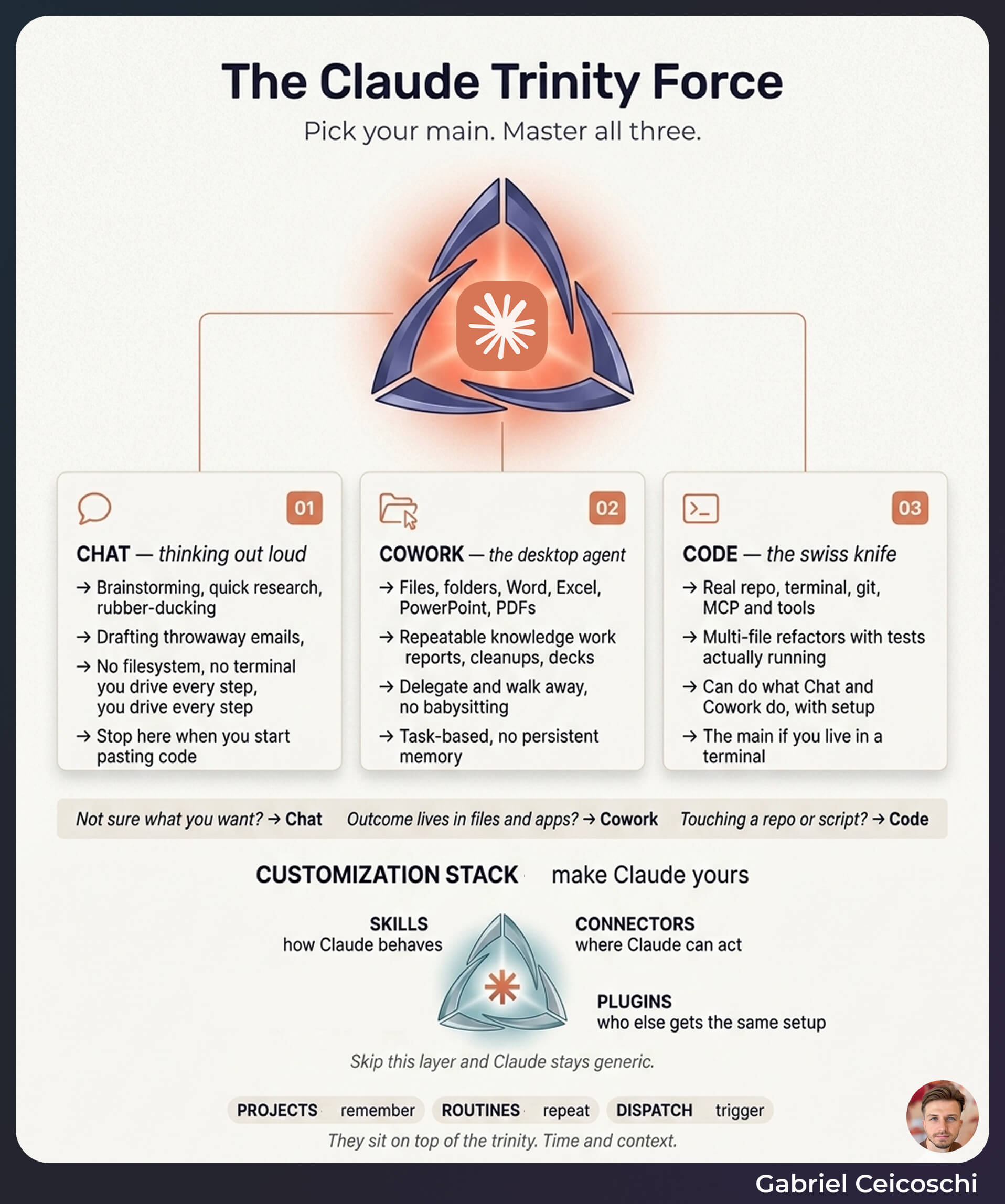
Claude has three primary interfaces — Chat, Cowork, and Code. Chat is for thinking: brainstorming, research, drafting. Cowork is a desktop agent that executes multi-step work across your files and apps. Code is the terminal, filesystem, and integration layer for deep automation. Same model, three wrappers built for different kinds of work.
Using Claude Code for everything is the new "I only use ChatGPT".
For the longest time, Code was my whole world. Apps, scripts, pipelines, content, all from a terminal on my laptop. It worked great until I wanted to start a job from my phone, or hand a task to someone non-technical on the team. Then I noticed I was carrying way more setup than I needed, and that most knowledge workers I talk to are sitting on the opposite problem. They live in Chat, never touch the other two, and wonder why their Monday morning still looks the same.
Claude ships three products on top of the same model. Same brain underneath, different wrapper for who's using it and where. Once you can name the three, you stop forcing every task into the wrong shape.
The trinity: think, do, build
Anthropic's own product pages and a lot of practitioner write-ups land on the same three-line summary. I've started using it as a filter before I open anything.
- Chat to think. Real-time conversation for brainstorming, research, explanation, and drafting. You stay in the loop and apply the output by hand.
- Cowork to do. A desktop-native agent. You describe the outcome, it executes multi-step tasks across local files, folders, and connected apps, then hands you back a finished artifact. (Anthropic product page)
- Code to build. Terminal, filesystem, git, and tool integrations. It runs commands, sees errors, iterates, and orchestrates other tools through MCP.
The trick is that the same task can fit any of the three depending on how often you do it and how much control you want. A one-off market scan is a Chat. The same scan, every Monday, against the same five competitors, is a Cowork routine. Build a dashboard based on your competitors database is a Code job.
I see people paste code into Chat for an hour when Code would have shipped it in five minutes. I see others fight a desktop agent in Cowork for something a 20-line script handles in its sleep. The mode is the first decision, not the last.
Chat: the cheap sandbox
Chat is the lowest-commitment surface and that's its strength. You can sketch a workflow, argue with yourself about an approach, or get a quick explanation without setting anything up. For knowledge workers without a technical background, this is also where most AI use stops, which is fine for a while and limiting after that.
Use Chat for:
- Brainstorming, framing, and pre-mortems before any real work starts
- Explaining unfamiliar libraries, tools, contracts, or concepts
- Drafting one-off emails, briefs, or first cuts of a doc
Don't use Chat for anything you do every week. The minute a task repeats, you're paying a tax to keep it conversational.
Cowork: the desktop agent for repeatable work
Cowork is the one most knowledge workers underestimate. Anthropic positions it as outcome-oriented and built for non-technical tasks, with examples like synthesizing research across many sources, extracting structured data from contracts, processing survey feedback, and preparing recurring reports. Their product overview frames the target user directly: "Anyone whose workday includes tasks that are time-consuming but not technically complex — researchers, analysts, operations teams, legal professionals — people who work with documents, data, and files every day and would rather spend their time on the judgment calls than the assembly." The pattern across early users backs this up.
A few real cases circulating in the community:
- A physician and angel investor used Cowork to clean up Desktop and Downloads, prepare tax documents across multiple entities, and analyze exported LinkedIn data in one sitting.
- A Reddit user processed hundreds of legal PDFs for a divorce case, renamed and organized files, and produced a master strategy markdown that consolidated evidence and reasoning — months of manual review compressed to a single Cowork session, with significant savings on legal and forensic accounting fees.
- Marketing teams use Cowork to clip a long video into shorts, populate branded slide templates with fresh metrics, and run repetitive browser workflows.
The common shape: high-effort, repeatable, document-heavy work where the user can clearly describe the outcome but doesn't want to write a script. Cowork shines on tax prep, contract review, weekly competitive briefs, monthly campaign reports, account and territory planning, and folder cleanup.
A few rules I've learned the hard way:
- Start on a test folder, never your live one
- Define the outcome in writing before you press go
- Save the output. Cowork doesn't keep long-term memory across sessions
- Review before you trust. Then trust a little more next time
Code: the orchestration layer
Code is the most powerful mode and the one with the steepest setup curve. It runs commands, edits files, calls APIs, and chains tools through MCP, the Model Context Protocol that lets Claude talk to external systems with explicit schemas.
For developers, Code handles repository-wide refactors, test-driven feature work, DevOps scripts, and internal tooling. That part is well covered. The more interesting story is what non-developers are doing with Code.
- Marketers running live analytics agents that pull from Search Console and a CRM, generate SQL, and produce audited briefs
- Sales ops building account-scoring models from CRM exports and intent signals
- Data teams spinning up agent groups where one agent acts as analyst, another as auditor, another as head of growth, all checking each other's work
Code becomes a force multiplier when you already have a technical stack to point it at. If you don't have one yet, that's a signal to start with Chat and Cowork and let Code wait until you have a workflow worth automating end to end.
The aux layer: Projects, Routines, Dispatch
Around the trinity sit a few smaller pieces that turn modes into infrastructure.
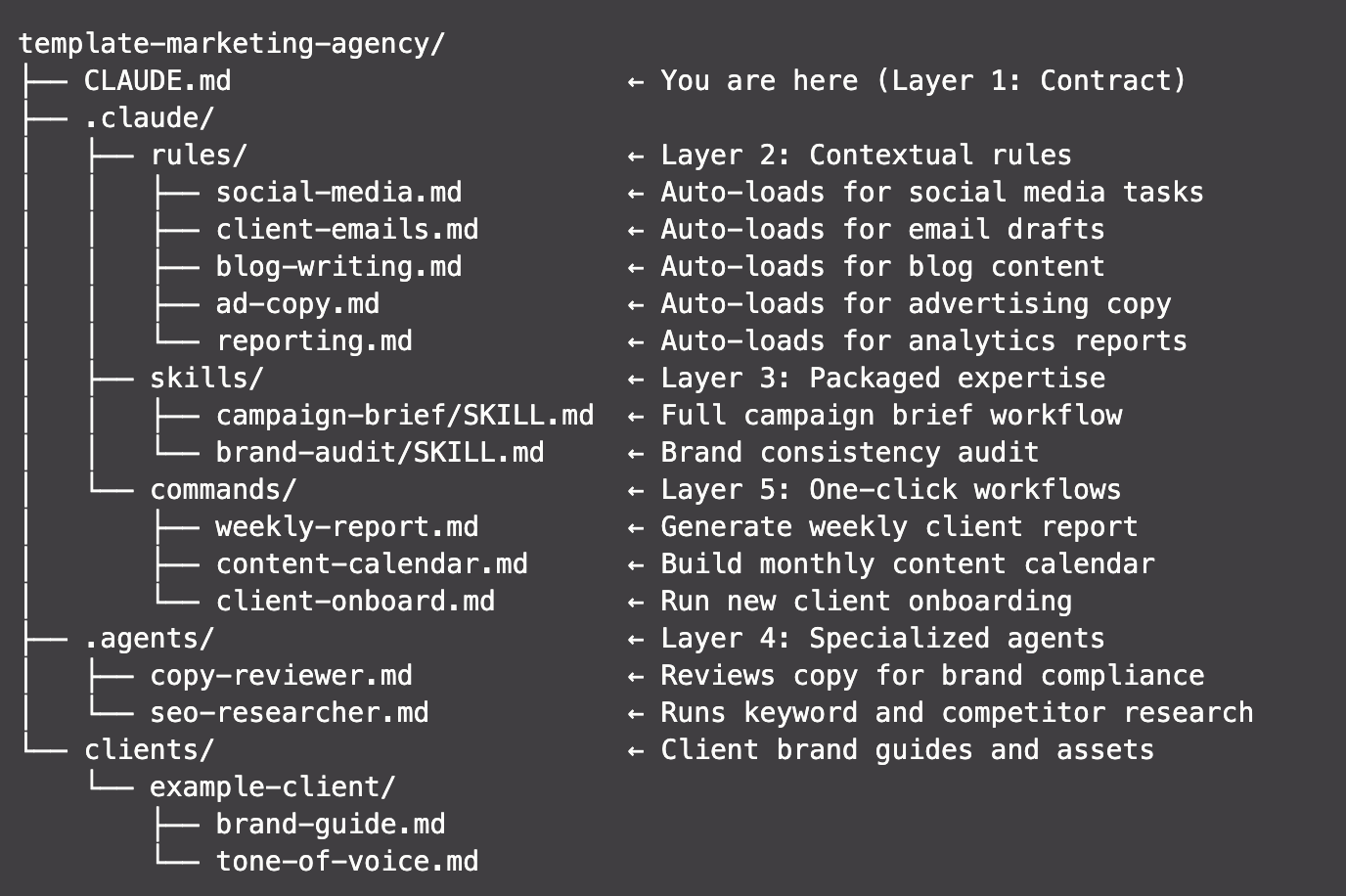
Projects are persistent containers for documents, instructions, and data. A project for a developer is a repo plus its docs and Skills. A project for a marketer is a client folder with briefs, templates, and exports. A project for a sales rep is a territory playbook. The point is that Claude infers context from the project instead of you re-explaining it every session.
Routines are scheduled or recurring runs of a Cowork or Code workflow. Weekly competitive briefs. Monthly financial rollups. Daily folder cleanup. Recurring reports stop eating Monday mornings.
Dispatch and mobile triggers let you fire a Cowork job from your phone and pick up the result later. "Organize the screenshots folder." "Synthesize these three PDFs into a one-pager." "Draft replies to the emails I starred." It shifts Claude from a tool you open to a service running in the background.
I hacked all three of these with Code before they existed (GitHub repos for Projects, GitHub Actions for Routines, SSH for remote access). The native versions are way cleaner and worth the switch.
The customization layer: Skills, Connectors, Plugins
Skip this layer and Claude stays generic. Everyone gets the same answers. Use it and Claude starts behaving like it works at your company.
Skills are organized folders of instructions, scripts, and reference docs that Claude loads dynamically based on the task. Anthropic's "Equipping agents for the real world with Agent Skills" frames them as the core mechanism for turning a general-purpose agent into a specialized one. In practice, Skills hold things like:
- Coding standards and review checklists
- Brand voice and content templates
- Sales qualification criteria and objection-handling frameworks
- Standard operating procedures
- Dataset schemas, metric definitions, and modeling conventions
Connectors and MCP tools are the integration fabric. They give Claude scoped access to external systems: CRMs, analytics platforms, databases, file stores. Best practice is to start read-only, add explicit schemas through Skills, and only enable write access once your guardrails are mature.
Plugins are packaged combinations of Skills, tools, and defaults that teams can share. Once a workflow proves valuable for one person, you wrap it as a plugin and roll it out so the rest of the team gets the same lift without having to rebuild it.
If Skills and Projects are where compounding starts, plugins are where it spreads.
The same task across roles
The modes map to intent, not job title. Same trinity, different combinations.
Software development
- Chat for architecture sketches, debugging conversations, and ADRs
- Cowork for housekeeping around the work: rename assets, restructure project folders, turn meeting notes into status reports
- Code for the actual repo work: refactors, feature builds, DevOps, internal tools, MCP-driven agents
Marketing
- Chat for ideation, positioning, and first-draft outlines
- Cowork for weekly briefs, campaign reports, content calendars, branded slide decks, and content repurposing
- Code for live analytics pipelines, SEO ops, bulk content transformations, and A/B test setup
Sales and GTM
- Chat for pre-call briefs, outreach drafts, and call plans
- Cowork for pre-call research routines, post-call note-taking, and account planning
- Code for account scoring, pipeline health analysis, and integration with the data stack
Operations and admin
- Chat for SOP drafts, policy docs, and "how do I" questions
- Cowork for folder cleanup, tax and compliance prep, contract review, and turning legacy folders into wikis
- Code for reconciliation scripts, back-office API integrations, and internal dashboards
Data and analytics
- Chat for translating business questions into analytical plans and explaining results
- Cowork for cleaning and reshaping CSVs, building report-ready decks, and synthesizing PDFs
- Code for ETL, modeling, evaluation, live warehouse queries, and multi-agent review setups
The gap between someone getting real leverage from Claude and someone stuck in Chat usually isn't intelligence or seniority. It's mode literacy.
How I'd start, by experience level
If you're brand new to Claude:
- Spend a week in Chat. Get a feel for the model
- Pick one repeatable task that eats your week and try it in Cowork on a test folder
- Save the output. Run it again next week. Notice what breaks
- Only then look at Code, and only if you have a workflow worth scripting
If you're already comfortable in Chat:
- Audit your last two weeks. Mark every task you did more than once
- Move the top three to Cowork, one at a time. Set a Routine for each
- Build one Project per major area of your work and load it with the docs you keep re-explaining
- If you have any technical stack at all, get one Code workflow running with an MCP connector
If you're already in Code:
- Stop forcing non-coding tasks through Code
- Hand the document-heavy stuff to Cowork. Start triggering jobs from your phone
- Package your best workflows as Skills and share them as plugins so your team isn't waiting on you
What this changes on Monday morning
The point of the trinity isn't to learn three tools. It's to stop paying the wrong tax on every task you do.
Mine is still Code. But I trigger jobs from my phone, throw the less technical work at Cowork, and I'm starting to share Projects and plugins with my team so they don't have to babysit me. That's a different shape of work than I had a year ago, and the shift wasn't about a new model. It was about picking the right wrapper.
You don't need to pick the "right" one. You need to know what each one is good at before you open it.
Pick a task this week. Ask yourself: am I thinking, doing, or building? Open the matching mode. See what happens.
Frequently Asked Questions
What is the difference between Claude Chat, Cowork, and Code?
Chat is for real-time conversation: brainstorming, research, drafting. Cowork is a desktop agent that performs multi-step work across files and apps and returns finished artifacts. Code is a terminal-and-repo environment for executing commands, editing files, and orchestrating tools through MCP. Same model, three wrappers for different kinds of work.
Do I need to be a developer to use Claude Code?
No, but you need a stack worth pointing it at. Non-developers use Code for live analytics pipelines, account scoring, content ops, and multi-agent review setups. If you don't have data sources or repeatable scripted work yet, start with Chat and Cowork and let Code come later.
When should I use Cowork instead of Chat?
Move a task to Cowork the moment it repeats. If you do it weekly or monthly, has clear inputs and a clear deliverable, and runs across files or apps, it belongs in Cowork. Chat is for thinking. Cowork is for doing.
What are Claude Agent Skills?
Skills are organized folders of instructions, scripts, and reference docs that Claude loads dynamically when a task matches their description. They turn a generic agent into a specialist for a specific role, codebase, or workflow. Anthropic positions them as the primary way to encode domain knowledge and standardize behavior across a team.
What is MCP and why does it matter?
MCP, the Model Context Protocol, is the integration layer that lets Claude call external tools and data sources with explicit schemas. It's how Code talks to your CRM, analytics warehouse, ticketing system, or internal APIs in a structured, scoped way. Without MCP and connectors, Claude is reasoning in isolation. With them, it acts on real systems.
How do Projects and Routines fit in?
Projects are persistent containers for the docs, instructions, and data tied to a domain or initiative, so you stop re-explaining context every session. Routines schedule recurring runs of Cowork or Code workflows so weekly reports, monthly rollups, and daily cleanups happen without you starting them.
Related articles
Show us how your team works.
Bring a process that wastes time or money. We will help you build an AI workflow around your data, tools and limitations.