Claude Code Multi-Agent Setup: How I Run Opus, Sonnet, and Codex Together
January 19, 2026
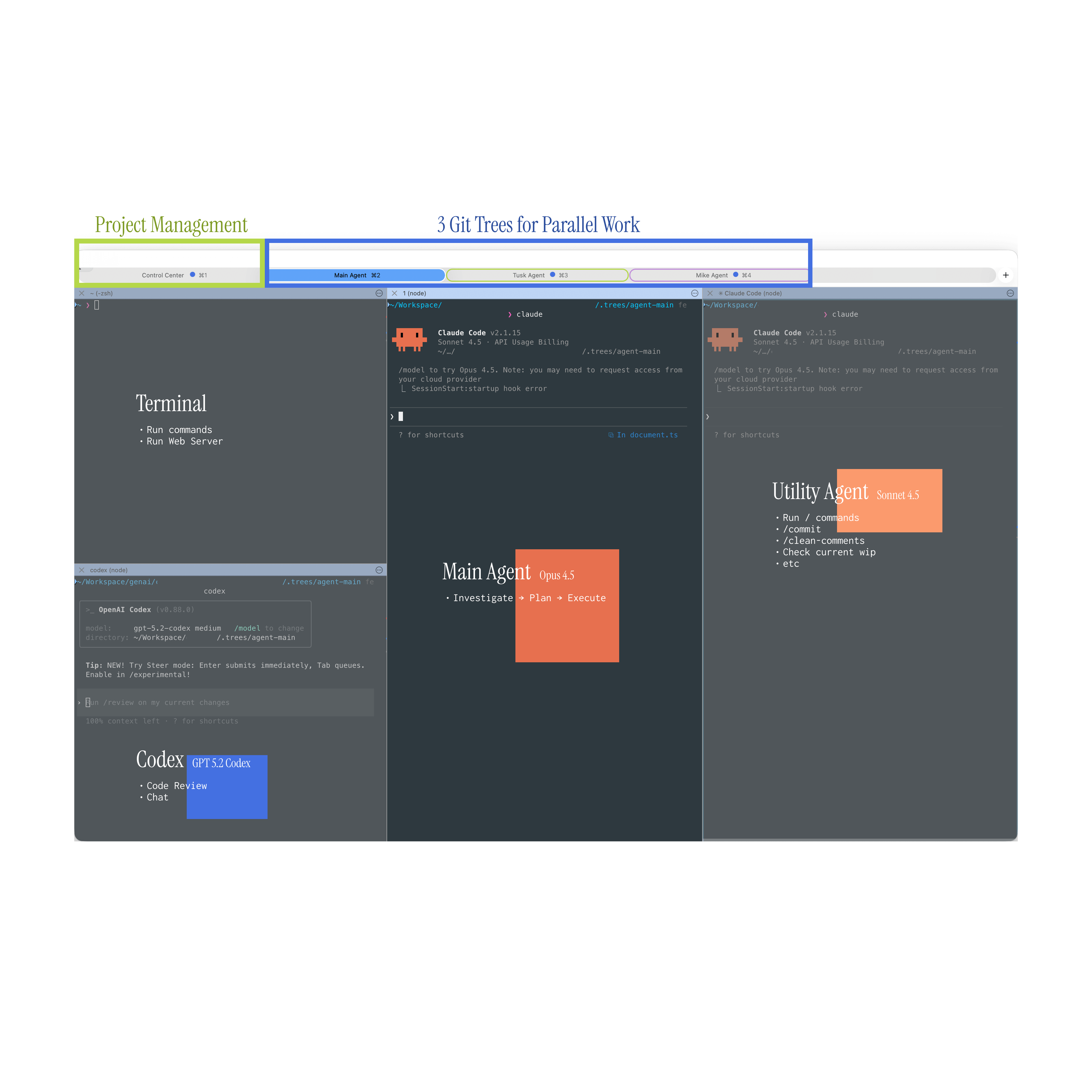
My Claude Code Setup
The context
As a software engineer I spend over 40-50 hours a week building, debugging, and refining my work. Lately I barely write any code. Maybe 10-20 lines per day.
To put things in perspective - a recent PR of mine had over 7k additions and 3-4k deletions, and all that code was written by AI.
But the real challenge isn't writing code. It's managing everything at once.
I cannot lock myself in a room and work on one thing at a time. Why?
There are many things going on. We've implemented a zero-bug policy, we refine UX every time we touch a feature, and we constantly refactor old code. All these things are very time-consuming and require a lot of context switching. Not to talk about new features.
With Claude Code it's easier, but you need a way to manage all these topics. So I optimized for that.
My everyday setup
Tools
- iTerm + zsh
- Claude Code + Codex
- VS Code
- MCPs: GitHub, Atlassian, our own
Tip: I use the Claude Code mcp-cli to reduce tokens used by loading all MCPs in the context window.
Terminal layout
- One terminal split into 4 windows
- Main window: Claude Code (Opus 4.5)
- Secondary window: Claude Code (Sonnet 4.5, thinking off) for commits, docs, comments, slash commands
- Codex window: code review only
- Fourth window: terminal commands and the web server
Scaling
- Replicate this setup 2-3 times using git worktrees
- Colorize and name tabs for easier tracking
- Each worktree has its own branch and feature/issue
My flow
- Opus 4.5: Investigate → Plan → Code → Repeat
- Codex: review only, paste issues back to Opus 4.5
- Sonnet 4.5: clean comments, docs, conventional commits
- A 4th tab acts as a control center for global processes, diffs, deploys, and utilities
Tips
- While Claude works, prepare the next prompt for the other tab
- Context tracking and switching improves with use, but focus drops by the end of the day. I haven't mastered this
- Work on slightly similar features to reduce context switching
Bonus: find your own setup. This is still a primitive setup. People go much further with keybindings, Wispr, RSVP readers, and crazy stuff.
What this looks like outside of engineering
My setup is built for software, but the pattern works for anyone juggling multiple workstreams.
The core idea: split your AI work by intent, not by tool. One channel for deep thinking, one for quick tasks, one for review. That's it.
Here are a few examples of how operations teams can apply the same approach:
- HR / Recruitment: Use one Claude window to draft job descriptions and interview frameworks. A second to summarize CVs and flag mismatches. A third to write candidate follow-ups and internal updates. You're not context-switching.
- Project management: One window investigates blockers and summarizes Jira or Linear tickets. Another drafts stakeholder updates and status reports. A third reviews meeting notes and extracts action items.
- Customer operations: One window analyzes support tickets for patterns. Another drafts responses or internal escalation notes. A third generates weekly reports or FAQ updates from the data.
- Finance / Procurement: One window reviews contracts and flags deviations from standard terms. Another drafts approval summaries. A third tracks vendor communications and deadlines.
The point isn't the specific tools. It's the habit of separating deep work from shallow work and giving each its own space. AI makes that possible because it holds context for you.
Tips for teams
- Create a shared Claude Code marketplace - build MCPs and share skills
- Commit MD files, skills, and slash commands
Don't overdo it. Otherwise you'll end up with a markdown graveyard.
Want to set up effective AI workflows for your team? Join our workshops where we teach the multi-agent approach, workflow optimization, and team collaboration patterns that turn individual AI use into team-wide productivity gains.
One call. We'll show you exactly what we'd build with your team.
No pitch decks. No generic proposals. Just a conversation about your workflows and what we can automate together.