Stop Prompting, Start Designing: 5 Layers to Get Consistent Results from AI
March 16, 2026
Stop Prompting, Start Designing: 5 Layers to Get Consistent Results from AI
Most teams using AI tools end up with the same thing: one big instruction file. 300 lines describing how to write, format, review, comply. All loaded every single session.
The problem: always-on instructions are expensive. Not in money. In attention.
Large language models have finite context windows. Every token of instruction you load competes with the actual task for the model's attention. Anthropic's prompt engineering guidelines say it plainly: shorter, focused prompts outperform long, unfocused ones.
When you dump everything into one file, the AI treats all of it as equally important. Your data privacy rules sit next to your formatting preferences. Compliance requirements share space with tone-of-voice notes.
The signal gets diluted. The AI starts ignoring things. Or worse, it follows the wrong instruction at the wrong time.
Big instruction files are a smell. They mean your system needs structure, not more words.
The Fix: Think in Layers
We reorganized everything into five layers. Each has one job.
Layer 1. The Contract (Always On)
The tiny set of rules the AI must always follow. No exceptions.
For us:
- Follow the standard workflow (intake, work, review, deliver)
- Never skip review
- Use existing templates before creating new ones
- Always verify before marking done
That's it. Ten lines, not three hundred.
If you work in sales, your contract might be: always use approved pricing, never promise delivery dates without checking, follow the CRM update process.
If you're in operations: follow the safety checklist, use approved vendors, document every deviation.
Always-loaded context should be tiny. Everything else loads only when relevant.
Layer 2. Contextual Rules (Load When Needed)
Instead of one giant file, focused rule sets that activate only for matching tasks.
- Writing a client email? Load tone-of-voice rules.
- Preparing a financial report? Load compliance formatting.
- Updating the CRM? Load data entry standards.
The AI gets precise guidance exactly when it needs it, not a wall of text to wade through.
This is the difference between handing someone a 50-page manual and giving them the right checklist for the task in front of them.
Layer 3. Skills for Complex Workflows
Some workflows are too complex for a rule set. Multiple steps, domain-specific knowledge, judgment calls.
These become skills. Packaged workflows that encode your expertise.
Think about what you do that actually requires experience:
- In HR, that might be running a compliant hiring process across jurisdictions
- In finance, preparing audit-ready documentation with the right categorization
- In marketing, creating campaign briefs that satisfy both brand and legal
- In legal, reviewing contracts against standard terms and catching deviations
Each of these becomes a structured skill the AI follows step by step, with your judgment calls baked in. You're encoding knowledge into something reusable, not just typing better prompts.
Layer 4. Specialized Agents for Parallel Work
Instead of one AI session juggling everything, spin up focused agents for specific jobs.
One reviews documents for compliance. Another handles data formatting. A third does research. They work in parallel, each with only the context they need.
It's the same reason you hire specialists instead of asking one person to do everything. Anthropic's September 2025 usage report found that "directive" AI conversations, where users delegate complete tasks rather than chat, rose from 27% to 39% in eight months. People are already moving this direction. Agents just make it reliable.
Layer 5. One-Click Workflows
Pre-built commands for tasks you repeat constantly.
- "Prepare the weekly report". Gathers data, formats it, flags anomalies
- "Review this document". Checks against standards, produces issue summary
- "Onboard this client". Runs intake checklist, creates folders and templates
Each command chains together the rules, skills, and context it needs. One button. Done.
The goal is consistency, not volume.
What Actually Changed
Before: every session started from scratch. Re-explain context. Forget important rules. Inconsistent results. Time spent fixing.
After: same standards every time, context loads automatically, and when something's wrong you fix one rule instead of digging through a 300-line document. New team members produce consistent work from day one because the system already knows how we do things.
The biggest shift was mental. We stopped prompting and started designing.
GitHub's research shows up to 55% faster task completion with structured AI workflows on routine work. The catch: only when the workflow is well-scoped. Dropping AI into your IDE without structure doesn't get you there.
How to Start
You don't need all five layers at once.
Start by auditing your instructions. What actually needs to be active all the time? Pull out only the non-negotiable rules. That's your contract.
Then group the rest by task. Client communication. Reporting standards. Data entry guidelines. Each group becomes a contextual rule set.
Once that's working, look at your complex workflows. What takes the most expertise and the most steps? Document the process, encode the judgment calls, package it as a skill.
Then pick the task you repeat most and build one command for it. Wire it up so it loads the right context and follows the right steps automatically.
After that, iterate. Start small. Test. Improve. You don't need to build all five layers in a week.
Frequently Asked Questions
Do I need to be technical to build a layered AI workflow system?
No. If you can explain your work process to a colleague, you can structure it for AI. The five layers map to how you already think about your work: what's always true, what depends on the task, what requires expertise, what can run in parallel, and what you repeat constantly. Most people build their first two layers in under an hour.
How is a layered AI workflow different from writing better prompts?
A good prompt gets you a good response once. A system gets you good responses every time without you having to remember every rule each session. A prompt is one email written well. A system is the SOP that makes every email good by default. Prompts are one-off. Systems compound.
How long does it take to set up an AI workflow system?
Layer 1 (your contract) takes about 30 minutes, and you'll notice the difference right away. Contextual rules take another hour or two. Skills and commands evolve over weeks as you spot patterns. Most teams have something solid within 2-4 weeks.
What AI tools does the layered workflow system work with?
Anything that accepts instructions: ChatGPT, Claude, Gemini, Microsoft Copilot, or industry-specific tools. The idea is the same everywhere: small always-on context, task-specific rules, packaged expertise. Claude Code and GitHub Copilot Workspace already support layered instruction files natively.
Can a layered AI workflow system work for a whole team?
That's actually where it works best. When rules, skills, and commands are shared, every team member benefits from everyone's expertise. New hires produce consistent work from day one because the system already knows how you do things. And it gets better over time as people refine the rules and skills.
What is the most common mistake when building AI workflows?
Putting everything in one instruction file and hoping the AI figures out what matters. It will try, but it loses focus. Output quality becomes inconsistent and you end up spending time fixing things. The fix is always the same: separate what's always needed from what's sometimes needed, and load context based on the task.
Example: What This Looks Like for a Marketing Agency
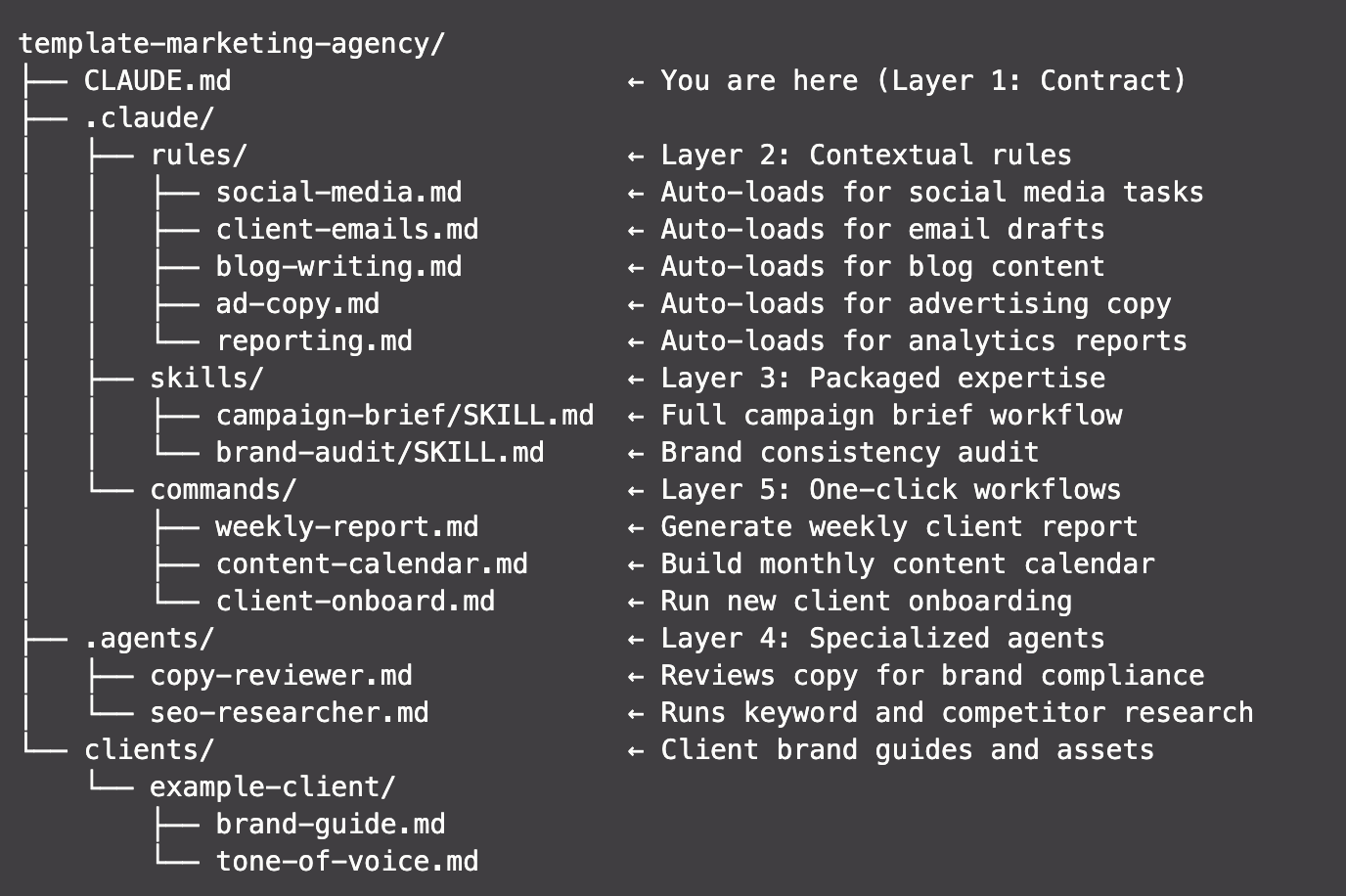
Here's a real folder structure showing all five layers in action:
template-marketing-agency/
├── CLAUDE.md                        ← Layer 1: Contract
├── .claude/
│   ├── rules/                       ← Layer 2: Contextual rules
│   │   ├── social-media.md          ← Auto-loads for social media tasks
│   │   ├── client-emails.md         ← Auto-loads for email drafts
│   │   ├── blog-writing.md          ← Auto-loads for blog content
│   │   ├── ad-copy.md               ← Auto-loads for advertising copy
│   │   └── reporting.md             ← Auto-loads for analytics reports
│   ├── skills/                      ← Layer 3: Packaged expertise
│   │   ├── campaign-brief/SKILL.md  ← Full campaign brief workflow
│   │   └── brand-audit/SKILL.md     ← Brand consistency audit
│   ├── agents/                      ← Layer 4: Specialized agents
│   │   ├── copy-reviewer.md         ← Reviews copy for brand compliance
│   │   └── seo-researcher.md        ← Runs keyword and competitor research
│   └── commands/                    ← Layer 5: One-click workflows
│       ├── weekly-report.md         ← Generate weekly client report
│       ├── content-calendar.md      ← Build monthly content calendar
│       └── client-onboard.md        ← Run new client onboarding
└── clients/                         ← Client brand guides and assets
    └── example-client/
        ├── brand-guide.md
        └── tone-of-voice.md
Every layer has a clear job. Nothing loads unless it's needed.
Want to build your own? Join one of our workshops and we'll walk you through the whole thing in a single session.
Try it yourself
Copy this prompt and paste it into ChatGPT, Claude, or any AI tool to start building your own 5-layer system.
Help me build a 5-layer AI workflow system. You will interview me, then generate real files I can use.

The goal is to produce this folder structure:

project/
├── CLAUDE.md                    ← Layer 1: Contract
└── .claude/
    ├── rules/                   ← Layer 2: Contextual rules
    ├── skills/                  ← Layer 3: Packaged expertise
    ├── agents/                  ← Layer 4: Specialized agents
    └── commands/                ← Layer 5: One-click workflows

Here is what each layer does:

- Layer 1 (Contract): CLAUDE.md. Max 10-15 lines. Non-negotiable rules that are always loaded. Example: "never skip review", "always use approved pricing", "follow the standard workflow".
- Layer 2 (Contextual Rules): Separate .md files in .claude/rules/. Each file contains task-specific guidance that only loads when relevant. A rule file should start with a comment explaining when it applies. Example: a tone-of-voice.md that loads when writing emails, a compliance.md that loads when preparing reports.
- Layer 3 (Skills): Folders in .claude/skills/, each with a SKILL.md. Multi-step workflows that encode judgment calls and domain knowledge. Each skill should have: a trigger description, step-by-step instructions, quality checks, and expected output format.
- Layer 4 (Agents): .md files in .claude/agents/. Focused assistants for parallel work. Each agent file defines: role, tools it can use, what context it gets, and what it produces.
- Layer 5 (Commands): .md files in .claude/commands/. Pre-built chains for daily tasks. Each command wires together the right rules, skills, and context. One click.

Example for a marketing agency:
- Contract: "Always follow brand guide. Never publish without client approval. Use templates before creating new ones."
- Rule: social-media.md (loads for social posts, defines platform constraints and hashtag rules)
- Skill: campaign-brief/SKILL.md (intake → research → brief → review → deliver)
- Agent: copy-reviewer.md (reviews all copy for bOne call. We'll show you exactly what we'd build with your team.
No pitch decks. No generic proposals. Just a conversation about your workflows and what we can automate together.